Introduction
Static site generators are everywhere in 2026 — and for good reason. They turn Markdown into fast, secure, cheap-to-host HTML. But after 16 years building enterprise systems, here’s what I’ve learned: the right tool is rarely the most powerful one. It’s the one that matches the actual problem. And for a personal blog on a hand-built portfolio site, the actual problem is embarrassingly small.
Most static site generators solve problems you don’t have. Here’s why I built one that solves the problem I do.
Every developer with a personal site eventually asks the same question: how do I add a blog? The internet’s answer is unanimous — use a static site generator. Hugo, 11ty, Astro, Jekyll, Gatsby. The options are endless, the tutorials are plentiful, and the promise is always the same: fast, secure, simple.
Except “simple” is doing a lot of heavy lifting in that sentence.
So I built BlogGen — a lightweight blog post generator with a visual editor — instead of adopting a full static site generator. Here’s how I think about it, and why it might be the right approach for you too.
What is a static site generator?
A static site generator takes content — usually Markdown files — and transforms it into plain HTML, CSS, and JavaScript files that can be served by any web server. No databases. No server-side rendering on every request. Just files.
This is genuinely a great idea. Static sites are fast (no server-side processing, CDN-ready from the nearest edge node), secure (no database means no SQL injection, no server-side code means no remote code execution), cheap (GitHub Pages, Netlify, Cloudflare Pages — all free for personal sites), reliable (no process to crash, no database connection to drop), and version-controlled (your entire site lives in a Git repo, every change is tracked).
The approach has been around since the mid-2000s, and the core idea hasn’t changed because it doesn’t need to. Serving pre-built HTML is objectively the right architecture for content that doesn’t change on every request. According to Jamstack.org, there are now hundreds of generators available — a testament to how broadly the approach has been adopted.
The real question isn’t whether static site generators are a good idea. They are. The question is how much complexity you’re willing to accept to get there.
The complexity problem with modern static site generators
Here’s where things get interesting. Let’s walk through what it actually takes to publish a blog post with the most popular generators in 2026.
Hugo: fast builds, steep learning curve
Hugo is fast — legendarily fast. Built in Go, it renders thousands of pages in seconds. But speed isn’t the hard part of blogging.
To get started with Hugo, you need to install the binary, pick a theme from hundreds of options, learn Hugo’s directory structure (content/, layouts/, static/, archetypes/, data/), understand Go’s template syntax, configure your site with a TOML or YAML file that can grow to hundreds of lines, figure out taxonomies and content types, and debug template rendering when something doesn’t look right.
Hugo is incredibly powerful. It can build documentation sites, multi-language portals, and complex taxonomy systems. But for a personal blog with ten posts, you’re learning a template engine more complex than the content you’re writing.
11ty: flexibility as a trap
11ty markets itself as “a simpler static site generator,” and compared to Hugo, it is. It’s JavaScript-based and supports multiple template languages — Nunjucks, Liquid, Handlebars, EJS, Pug.
That flexibility is also its trap. 11ty gives you so many ways to do things that you spend more time deciding how to do something than actually doing it. The .eleventy.js configuration file is JavaScript, which means it can do anything — filters, shortcodes, plugins, custom collections, computed data. It’s powerful and elegant, but it’s a configuration rabbit hole that can consume an afternoon before you’ve written a single word of content.
Astro: a web framework in disguise
Astro is the newest contender and it’s impressive. It introduced “islands architecture” — interactive components embedded in otherwise static HTML. It supports React, Vue, Svelte, and Solid. It has built-in image optimization, content collections with TypeScript schemas, and a growing ecosystem.
It’s also a full web framework disguised as a static site generator. The astro.config.mjs, the .astro component syntax, the src/pages/ routing convention, TypeScript configuration, npm dependency management — you’re setting up a web application that happens to output static HTML.
For a team building a marketing site with interactive elements, Astro is phenomenal. For one person who wants to publish thoughts on the internet, it’s like buying a commercial kitchen to make toast.
What I actually needed
Here’s the real question: what does a developer with a personal site actually need from a blog tool?
My requirements were simple: write blog posts in Markdown, generate styled HTML pages that match my existing site design, manage posts without touching the command line every time, and not restructure my entire website around a framework’s opinions.
That’s it. No taxonomies. No multi-language support. No component islands. No build pipeline. No node_modules folder with 847 packages.
My website is vanilla HTML, CSS, and JavaScript. It loads fast, works everywhere, and I understand every line of it. The last thing I wanted was to hand that simplicity over to a framework that would reorganize my files, impose its own conventions, and add a build step between me and my content. If you’ve read about how I approach building tools from scratch, you’ll recognize the pattern: start with the actual problem, not the most popular solution.
How BlogGen works: a simpler alternative to static site generators
BlogGen does exactly one thing: it turns Markdown files into standalone HTML pages.
Write a post in Markdown with simple YAML frontmatter (title, category, tags, date)
Generate the HTML with one click
Done. The HTML file is ready to serve
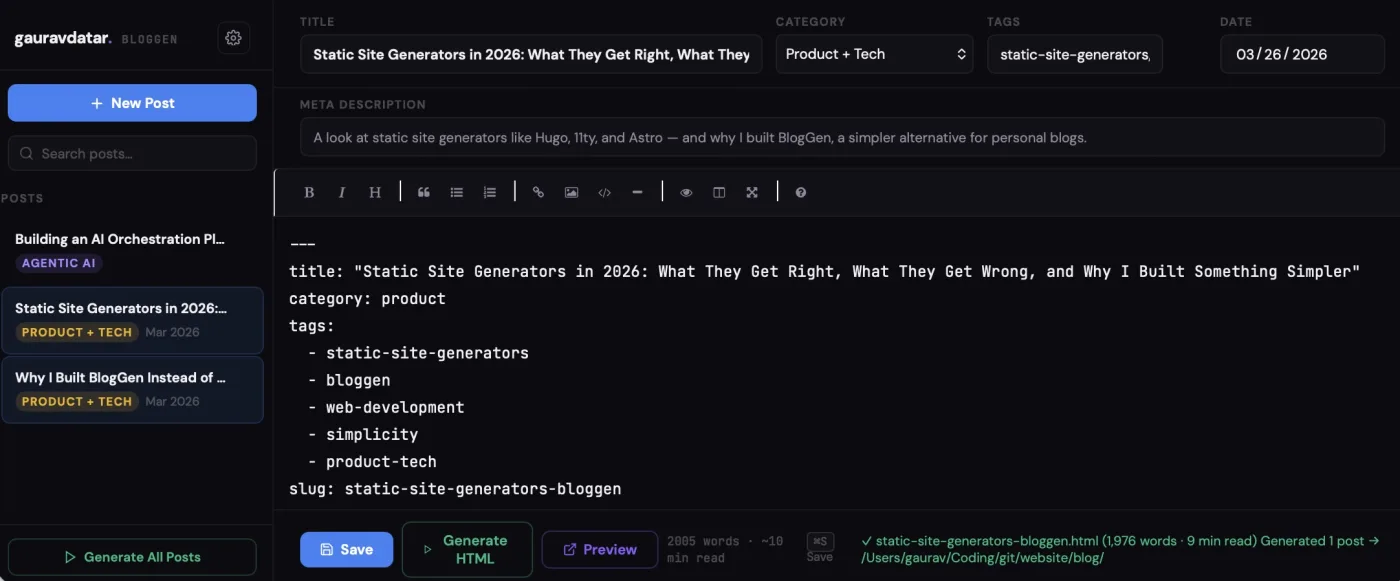
The entire tool is three files: generate.js (the Markdown-to-HTML converter, two npm dependencies: gray-matter and markdown-it), server.js (a local HTTP server powering the admin UI), and admin.html (a browser-based editor with live preview).
Two npm dependencies. Not two hundred. Two.
The visual editor changes everything
Here’s what genuinely separates BlogGen from traditional generators: you don’t need the terminal to write and publish.

The admin interface gives you a Markdown editor with formatting toolbar and preview, frontmatter fields rendered as form inputs (no YAML syntax to remember), one-click generation, live preview of the styled result, post management with search and filter, automatic word count and read time, and keyboard shortcuts (Cmd+S to save, Cmd+N for new post).
With Hugo, 11ty, or Astro, the workflow is: open terminal, create file, write frontmatter from memory, write content, run build command, check output, fix issues, rebuild. With BlogGen: open browser, click “New Post,” write, click “Generate.” That’s not marginal — it’s a fundamentally different experience.
No opinions about your site structure
This is the detail that matters most. Static site generators are opinionated. Hugo wants your content in content/. Astro wants your pages in src/pages/. 11ty wants a .eleventy.js at your project root. They all assume they’re generating your entire site.
BlogGen generates individual blog posts. It doesn’t care about your site structure. It doesn’t want to own your index.html. It produces a standalone HTML file, and you decide where it goes.
My portfolio site existed before BlogGen, and it’ll exist if I stop using BlogGen tomorrow. That independence is a feature, not a limitation.
Styling that matches, not fights
When you use a static site generator, your blog’s design is determined by themes. If the theme doesn’t match your existing site’s aesthetic, you’re either customizing the theme (which means learning its template system) or building your own from scratch.
BlogGen generates HTML that inherits your site’s existing stylesheet — the same CSS custom properties, the same fonts, the same color palette. Because it’s not a framework with its own rendering pipeline, the styling integration is seamless by default.
Built-in features, no plugins
Static site generators have plugin ecosystems. Need syntax highlighting? Plugin. RSS feed? Plugin. Reading time? Plugin. Each plugin is another dependency, another configuration step, another thing that can break on update.
BlogGen includes what a blog actually needs, built in: syntax highlighting for code blocks, callout blocks for tips and warnings, reading progress bar, scroll-reveal animations, social share buttons, author cards, and SEO-ready output with meta descriptions and semantic HTML. No plugins to install. No configuration to maintain.
Building something with AI or thinking about your own developer tools? I write about architecture, product strategy, and the decisions behind shipping real systems. Subscribe to the newsletter →
When you should use a static site generator
I’m not arguing that static site generators are bad. They’re excellent tools for the right job.
Hugo is perfect for large documentation sites, multi-language content, and teams that need blazing build speeds across thousands of pages. 11ty is ideal for data-driven sites where content comes from APIs or CMSes and you need maximum template flexibility. Astro is the right choice when you need interactive components alongside static content — marketing sites with embedded React widgets or dashboards.
If you’re building a site with hundreds of pages, complex navigation, and multiple content types, a full static site generator will serve you well. The complexity is justified by the complexity of the problem. The Kinsta developer blog has a thorough comparison of when each tool fits best.
When you shouldn’t
But if you’re a developer with a personal site who wants to publish the occasional blog post — and you don’t want to learn a framework, maintain a plugin ecosystem, or restructure your site around someone else’s conventions — you don’t need a static site generator. You need a blog post generator.
That’s what BlogGen is. It’s the tool I wished existed when I searched “how to add a blog to my static site” and every answer assumed I wanted to rebuild my entire site from scratch. The same instinct drives all my work as Gaurav Datar — make the complex, clear, and don’t reach for a framework when a focused tool will do.
The best tool isn’t the one with the most features. It’s the one that gets out of your way and lets you write.
FAQs
What is the best static site generator for a personal blog?
It depends on how much complexity you’re comfortable with. If you want a full-featured system and don’t mind learning a template engine, Hugo and 11ty are strong choices — Hugo for speed, 11ty for JavaScript-native flexibility. If you want zero framework overhead and your site is already hand-built HTML, a minimal tool like BlogGen that generates standalone pages without taking over your project structure is a better fit.
Are static site generators good for SEO?
Yes — they’re excellent. Static sites load fast (great for Core Web Vitals), serve pre-rendered HTML that search engines can crawl easily, and don’t require JavaScript to display content. The main trade-off is losing dynamic personalization, but for blogs, documentation, and marketing pages, static is one of the best approaches for search performance.
BlogGen is open source and built into this site’s tools directory. If you have a static site and want a zero-complexity blog setup, explore the code on GitHub →